

Process your final payroll run as normal, print the reports and do the RTI submissions as usual.
Housekeeping and Good Practice
1. Issue P45s for leavers.
HMRC rules state that an employee should be made a leaver upon their final pay. If there are any employees that are not returning in the new tax year, mark them as leavers now.
2. Reconcile the payments made to HMRC.
Print the P32 from Reports > Statutory and check your HMRC online account to ensure that all the submissions have been sent and paid.
Compare the payments to your bank statements.
3. Check the Directors’ year to date National Insurance calculations if you started using Key2Payroll partway through the tax year.
Print the P11 report from Reports > Statutory.
The following resources can be found on the gov.uk website to help you with this:
- Use the leaflet CA44 National Insurance for company director’s leaflet, or
- Use the Director’s National Insurance contributions calculator.
Year End Process
1. After all the pay runs have been finalised for the year, the button on the Payroll tab will change to Start Year End Process.
2. Select Start Year End Process.
3. The Close Tax Year screen appears and shows the actions that occur during the year end close.
These actions include:
- Change Tax Codes
- Remove Week1/Month 1
- Email P60s or push P60s to MyEPayWindow
- RTI Submissions for:
- P11Ds
- Final Submission EPS
- Employment Allowance EPS, If you claimed Employment Allowance this year
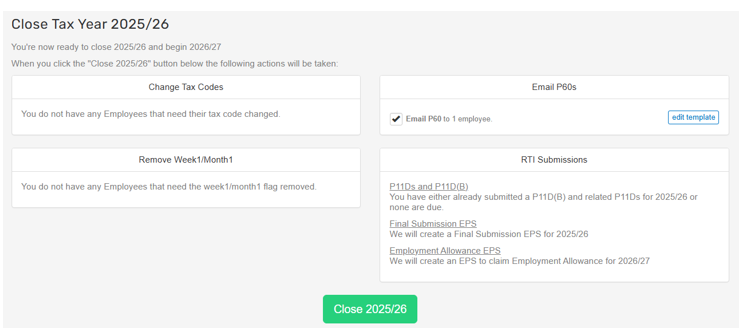
4. Select Close 2025/26.
5. If you get a message advising you to configure your pay schedule, select Set Schedule and confirm the dates.
Click on Update to save.

6. Check the Dashboard and submit any outstanding RTI submissions.
The year end is now complete, and you can start your first pay run of the new year.
To download copies of the P60s, go to Reports > Statutory > P60.
Check for any notices from HMRC that need to be applied in the new year.
If you have employees with expenses or benefits, the P11D form can be found in Reports > Statutory

Was this article helpful?
That’s Great!
Thank you for your feedback
Sorry! We couldn't be helpful
Thank you for your feedback
Feedback sent
We appreciate your effort and will try to fix the article