

MTD IT quarterly submissions are mandatory and form the foundation of the year’s financial reporting. Accurate and timely updates ensure that when the fifth and final submission is completed — incorporating adjustments, reliefs, and any corrections — the resulting figures are based on reliable underlying data.
Before submitting any obligations, review all transactions entered for the reporting period across the entire company. This provides assurance that all income and expenses have been captured and categorised correctly. This review is particularly important if you are submitting multiple sets of obligations.
Landmark Systems are not tax specialists and cannot advise on how your nominal codes should be categorised. For any queries relating to allocation, please consult your Accountant or Tax Adviser.
Reviewing Transactions and their Categorisation:
On the Self-Assessment screen:
- Highlight any Tax Entity
- Click on Transactions to view all transactions linked to one National Insurance number (i.e. with two entities you will see both together). The transactions will be grouped by HMRC category for easier checking
- Use the + icon to expand each group and review the detailed transactions contributing to the totals. Check to make sure any new nominals you have created in the period are mapped correctly
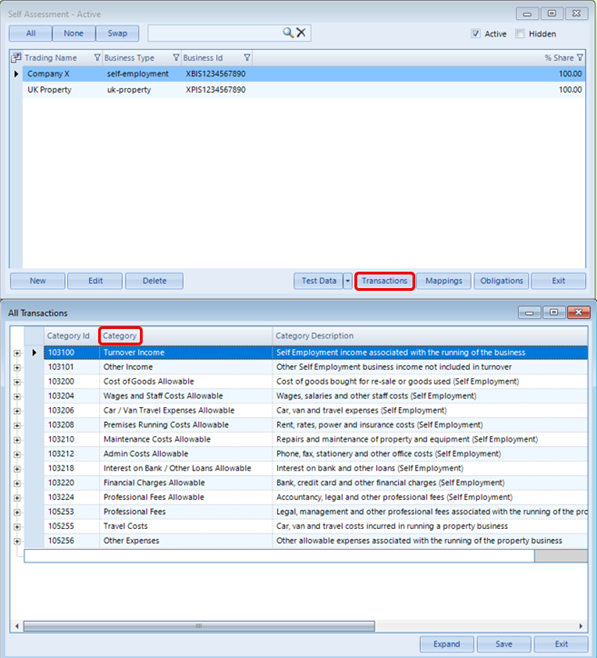
Review the imported transactions to ensure all expected income and expenses are present and no transactions have been duplicated or omitted. Please note that the All Transactions preview may display transactions with dates that fall outside the selected submission date range. These transactions are shown for review purposes only and will not be included in the submission. You can verify this in Obligations, where only transactions that fall within the submission date range are included in the period being submitted.
Category allocation is determined by the Taxable Entity mappings applied to each transaction. If more than one Taxable Entity exists, the default allocation follows this hierarchy:
- Analysis Taxable Entity (if the detail line contains an Analysis)
- Enterprise Taxable Entity (if the detail line contains an Enterprise)
- Nominal Taxable Entity
- Nominal Group Taxable Entity
- If no Taxable Entity is set, it must be assigned manually
Understanding this hierarchy is important when reviewing how transactions are mapped to HMRC categories.
Resolving Missing Taxable Entity Warnings
A red warning triangle icon displayed in the Taxable Entity or Category columns indicates that no Taxable Entity has been applied to that transaction.
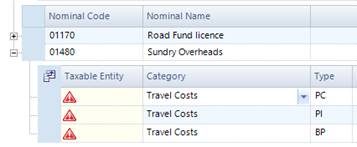
These transactions can and should be corrected before submission. Amend the allocation as required to ensure accurate reporting in Obligations.
Once all transactions have been reviewed and any necessary amendments made > Save to confirm your postings.
Submitting Obligations
Click on Obligations > Retrieve > Click on the required period below > Transactions
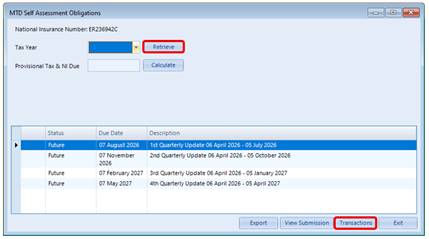
Check the amounts carefully before making your quarterly submission to ensure all income and expenses are correct. Expand each category using the + icon, as described above, to review the underlying transactions. Review the net totals for the quarter and confirm that all expected transactions are present, no transactions have been duplicated or omitted, and the figures appear reasonable for the period >Confirm
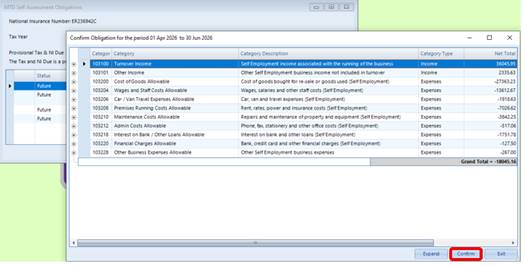
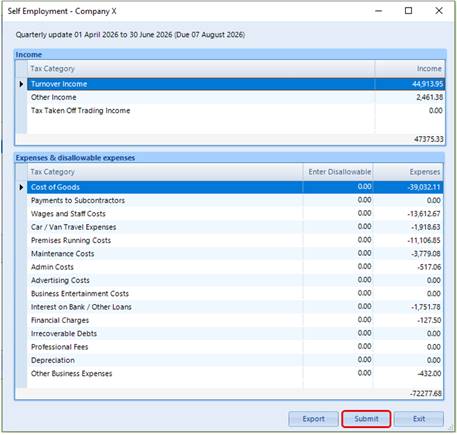
Review the income and expenditure overall amounts, as HMRC expects quarterly updates to be as accurate as possible, even though you can make corrections later in the year. This report can be exported to Excel if required.
Click on Submit to complete the submission process. You will get a message to say if it has been successful.
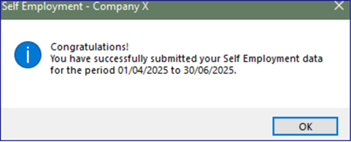
If you need to view the data after the submission has been made, you can highlight the quarter again in the Obligations screen and click on View Submission. There is also the option to Export the data to a .csv file.

Was this article helpful?
That’s Great!
Thank you for your feedback
Sorry! We couldn't be helpful
Thank you for your feedback
Feedback sent
We appreciate your effort and will try to fix the article